Plans
Unlimited professionals. You pay only for the notifications.
Bookings, services, professionals and clients have no limit on any plan — none of that costs us per use. Every notification that goes out to your client on WhatsApp does: Meta charges per message. So that, and only that, is what the plans measure.
Every plan: unlimited appointments, services, professionals and customers.
-
Start here
Essential
500 WhatsApp notifications a month
about 150 appointments
You work alone and want to stop losing time slots.
Brazil R$ 64,90 a month
-
Standard
1,000 WhatsApp notifications a month
about 300 appointments
A full calendar, with one or two people working.
Brazil R$ 122,90 a month
-
Advanced
2,000 WhatsApp notifications a month
about 600 appointments
A full calendar every day, with the team already in place.
Brazil R$ 239,90 a month
-
High volume
3,300 WhatsApp notifications a month
about 1,000 appointments
High volume all day, with several people working at once.
Brazil R$ 389,90 a month
30 days free to try
With 150 notifications included, no card and no subscription — that only exists once you pick a plan inside the app.
You do not pay per professional here. You can register the whole team on any plan — the people who work with you cost us nothing, so they cost you nothing.
Appointments is what the allowance was sized for: three notifications per appointment — the confirmation, the confirmation request and the client’s reply — plus some headroom on top, for reschedule and cancellation notices.
Every plan includes a calendar per professional, automatic confirmation with a deadline, your own booking page, QR code, poster, analytics and the log of every message sent.
Where the appointment count comes from
One appointment uses up to three notifications: the confirmation the moment the client books, the confirmation request before the appointment, and the one-tap reply they give. The number on the cards assumes all three go out on every appointment, and still keeps headroom on top — because rescheduling and cancelling also notify the client, and also count. That is on purpose: notifying costs little and not notifying costs a client.
You get more appointments out of the allowance when people book for the next few hours: with less than six hours’ notice there is no time to ask for confirmation and wait, so the slot comes in already confirmed and spends one notification instead of three. And if you turn the confirmation request off, it stays at one forever.
You see what you spent, item by item
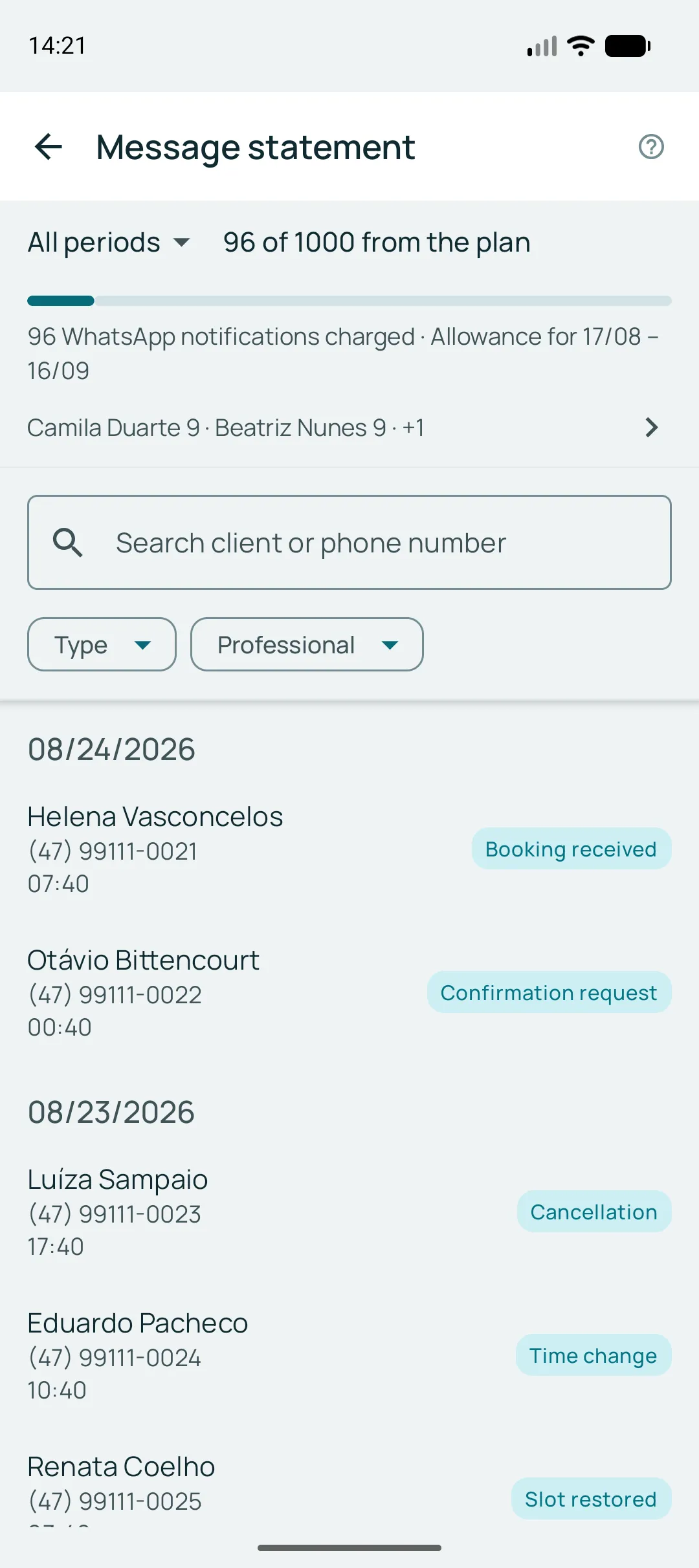
The app shows how many notifications have gone out in the period, when the allowance renews, and the log of every message sent — who it went to, what kind it was, and which professional it belonged to.
Ran out before the period ended?
You buy an extra pack of notifications straight from the app. The credits do not expire and only start being used once the period allowance is gone.
And when the trial ends?
Nothing is deleted. The account stays yours, the calendar stays readable and the history stays put. What stops is the notifications to clients — and they come back the moment you subscribe.
Google Play does the billing
The purchase happens inside the app, with the Google account already on your phone. Changing plan or cancelling happens there too, in your subscription — with nobody to talk to.
If a payment fails
Your data stays. The calendar stays readable and, for a few days, anyone who already had a time booked is still notified — your client never finds out that something happened to you.
Install it and look at your own calendar
The plan comes later. First you create your services and share your link.