

Choosing a booking app
How do I choose a booking app for manicures and nail services?
Choose a calendar that reserves the full service and extra time, explains pricing clearly and makes a return visit easy to arrange. Test the customer journey on a phone before deciding; a feature list alone cannot show whether a tool fits your work.
In this guide
1. Start with the appointments that tend to run late
Polish, new extensions, maintenance and removal do not need to take the same time. Check whether you can set separate durations and explain which option customers should choose.
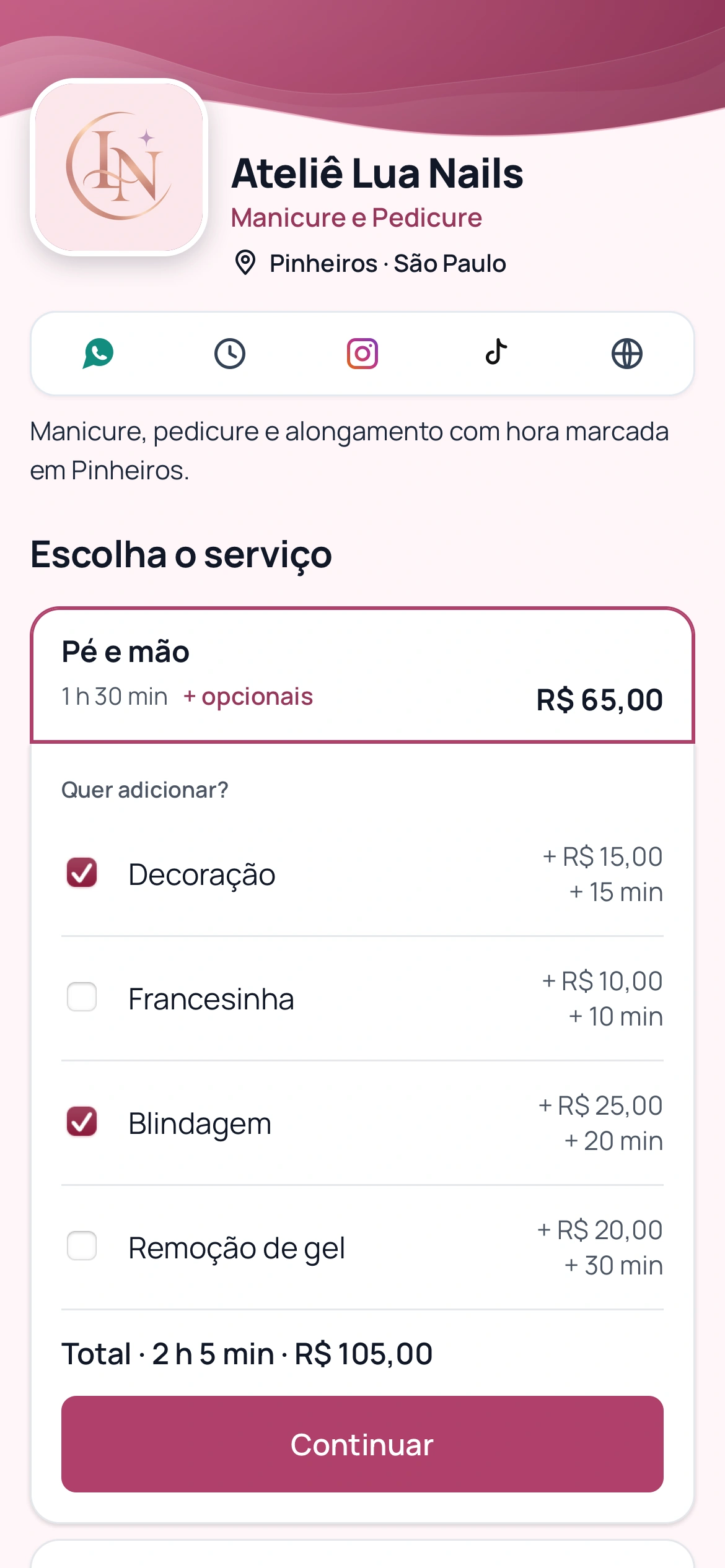
If nail art or removal adds work, check that selecting it also reserves time. Illustrative example: 90 minutes of maintenance plus a 20-minute extra need 110 available minutes. Use your actual durations.
- Separate durations for different services.
- Extra prices and time visible before booking.
- A description of what is included and how pricing works.
2. Test confirmations, return visits and the customer’s phone
Open the link as a new customer. Check whether services make sense, times are available and booking does not require you to explain each step. Find out whether customers must install an app or create an account.
Ask how confirmation, cancellation and rescheduling work. For return visits, check history and future bookings. Compare WhatsApp conditions, included messages and additional message costs as well as reminder claims.
- Test maintenance with an extra.
- Check cancellation, rescheduling and applicable rules.
- If you have a team, check services and hours per professional.
Nail maintenance and extras in a product demonstration. Illustrative data; Portuguese screenshot.
3. How these criteria apply to BookingChat
This guide is published by the BookingChat team. Services have durations and pricing types; selected extras add time and price. Availability considers the full duration. Customers book in a browser without creating an account and professionals manage appointments in the app.
WhatsApp confirmation requests depend on settings, an active plan and message balance. History helps you review visits; the product does not send an automatic campaign to bring every customer back. Keep capacity at 1 if you serve one person at a time. Check current plans and test a real service and extra combination before deciding.
Try it with the services you actually provide
No card required to try it.
App for Android and iPhone. Your customer books in their browser.